È importante ai fini SEO sfruttare il “Titolo SEO” e la “Meta Descrizione” dei prodotti Woocommerce, in quanto vengono utilizzati dai motori di ricerca per capire il contenuto della pagina. Yoast SEO fornisce una rapida indicazione attraverso un semaforo che permette di capire se le informazioni inserite sono ben ottimizzate.
Esempio:
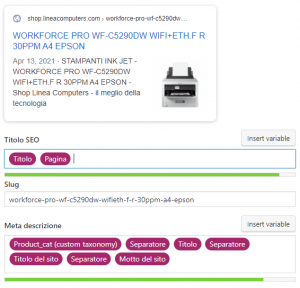
Per semplificare questa operazione Yoast SEO offre la possibilità di aggiungere automaticamente Titolo SEO e Meta Descrizione per ogni tipologia di contenuto.
È possibile configurare per ogni tipo di contenuto (in questo caso nei prodotti) Titolo SEO e Meta Descrizione inserendo delle variabili:
- Fai click su “SEO”
- Fai click su “Aspetto della ricerca”
- Vai nella sezione “Tipo di contenuto”
- Scegli il tipo di contenuto, in questo caso “Prodotti”
- Verifica che entrambe le “impostazioni per singoli URL di Prodotto” siano flaggate
- Inserisci le variabili nei campi “Titolo Seo” e “Meta Descrizione”
Esempio:
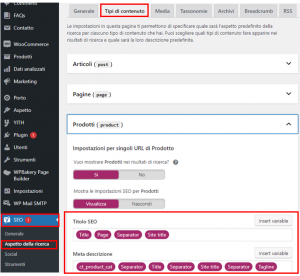
Le variabili che compaiono nella lista di WordPress sono solo tre, ma ne esistono molte altre.
Di seguito la lista completa delle variabili:
| Label | Variable | Description |
|---|---|---|
| Date | %%date%% |
Replaced with the date of the post/page |
| Title | %%title%% |
Replaced with the title of the post/page |
| Parent title | %%parent_title%% |
Replaced with the title of the parent page of the current page |
| Archive title | %%archive_title%% |
Replaced with the normal title for an archive generated by WordPress |
| Site title | %%sitename%% |
The site’s name |
| Tagline | %%sitedesc%% |
The site’s tagline |
| Excerpt | %%excerpt%% |
Replaced with the post/page excerpt (or auto-generated if it does not exist) |
| Excerpt only | %%excerpt_only%% |
Replaced with the post/page excerpt (without auto-generation) |
| Tag | %%tag%% |
Replaced with the current tag/tags |
| Category | %%category%% |
Replaced with the post categories (comma separated) |
| Primary category | %%primary_category%% |
Replaced with the primary category of the post/page |
| Category description | %%category_description%% |
Replaced with the category description |
| Tag description | %%tag_description%% |
Replaced with the tag description |
| Term description | %%term_description%% |
Replaced with the term description |
| Term title | %%term_title%% |
Replaced with the term name |
| Search phrase | %%searchphrase%% |
Replaced with the current search phrase |
| Separator | %%sep%% |
The separator defined in your theme’s wp_title() tag. |
| Label | Variable | Description |
|---|---|---|
| Post type (singular) | %%pt_single%% |
Replaced with the content type single label |
| Post type (plural) | %%pt_plural%% |
Replaced with the content type plural label |
| Modified | %%modified%% |
Replaced with the post/page modified time |
| ID | %%id%% |
Replaced with the post/page ID |
| Name | %%name%% |
Replaced with the post/page author’s ‘nicename’ |
| User description | %%user_description%% |
Replaced with the post/page author’s ‘Biographical Info’ |
| Page number | %%page%% |
Replaced with the current page number with context (i.e. page 2 of 4) |
| Pagetotal | %%pagetotal%% |
Replaced with the current page total |
| Pagenumber | %%pagenumber%% |
Replaced with the current page number |
| Caption | %%caption%% |
Attachment caption |
| Focus keyword | %%focuskw%% |
Replaced with the posts focus keyphrase |
| Term404 | %%term404%% |
Replaced with the slug which caused the 404 |
| <custom-field-name> (custom field) | %%cf_<custom-field-name>%% |
Replaced with a posts custom field value. Remove the <> |
| <custom-tax-name> (custom taxonomy) | %%ct_<custom-tax-name>%% |
Replaced with a posts custom taxonomies, comma separated. Remove the <> |
| <custom-tax-name> description (custom taxonomy) | %%ct_desc_<custom-tax-name>%% |
Replaced with a custom taxonomies description. Remove the <> |
| Variable | Description |
|---|---|
%%ct_product_cat%% |
Product category (comma separated) |
%%ct_product_tag%% |
Product tag (comma separated) |
%%ct_pa_<product-attribute-slug>%% |
Product attribute (comma separated). Be sure to remove the <> as they are not needed. |